Can a Scanner Force a DPF Regen?

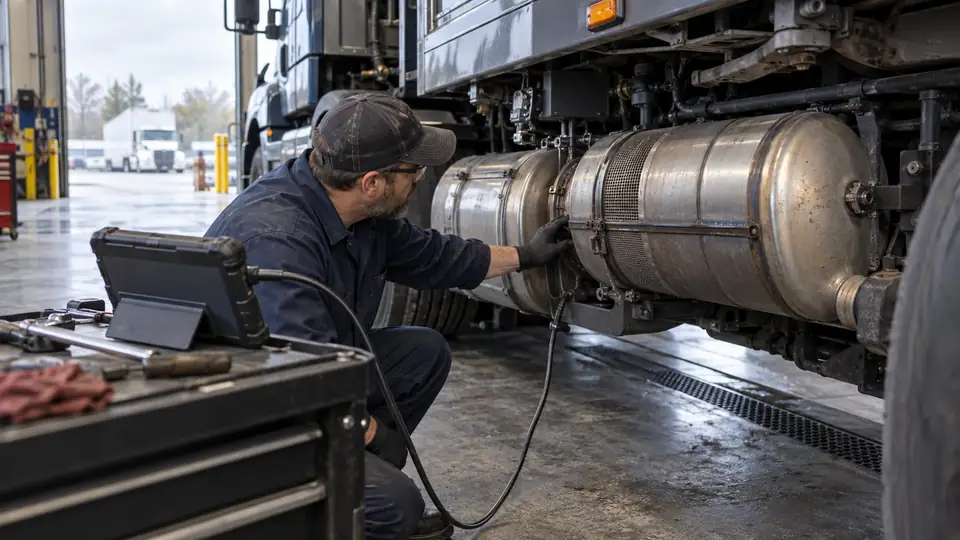
Yes, a compatible heavy-duty scanner can initiate a DPF regeneration on some trucks. The command is usually called a forced regeneration, parked regeneration, or service regeneration. However, a scanner cannot guarantee that the engine control module will accept the request or that regeneration is safe to perform.
The truck, engine, ECU, scanner software, and operating conditions must all support the function. A scanner that reads DPF fault codes may have no ability to command a regeneration. Likewise, a tool that lists DPF service functions may support only selected vehicles or regeneration procedures.
What a Scanner Does During a Forced Regeneration
During a commanded regeneration, the scanner sends a service request to the relevant ECU. If the request is accepted, the ECU manages the engine and aftertreatment system according to its programmed strategy. This may involve changing fueling, exhaust temperature control, and other engine operating parameters to burn accumulated soot in the diesel particulate filter.
The scanner does not independently clean the filter or override every protection built into the truck. The ECU may refuse, pause, or stop the regeneration if it detects a condition that could damage the engine or aftertreatment system.
Terminology varies by manufacturer. A menu labeled DPF regeneration might refer to an automatic regeneration command, a parked regeneration, or a service routine with specific vehicle requirements. Read the scanner’s on-screen instructions and the applicable service information before starting the procedure.
What Must Be Supported
Successful operation depends on several separate layers of compatibility. Physical connection is only the first layer. A connector that fits does not prove that the scanner can communicate with the correct ECU or access its regeneration routine.
| Requirement | What to verify |
|---|---|
| Truck application | The exact make, model, model year, engine, and aftertreatment system |
| Communication | The applicable vehicle network, protocol, adapter, and scanner interface |
| ECU access | Access to the engine or aftertreatment module that controls regeneration |
| Diagnostic coverage | Ability to read relevant DPF data and fault information |
| Service-function coverage | A listed command for forced, parked, or service regeneration on that application |
| Software access | The scanner software version, license, and any required service access |
J1939 support can help a scanner communicate with supported heavy-duty systems, but it does not establish regeneration access for every truck or ECU. Older vehicles may use different commercial-vehicle diagnostic arrangements, and coverage can vary by model year and engine configuration.
How to Check Whether the Function Is Available
Before connecting the scanner, identify the truck and engine as precisely as possible. Then check the scanner’s coverage information for the required service function. Look for wording such as DPF regeneration, forced regeneration, parked regeneration, or aftertreatment service. A general statement such as “DPF diagnostics” is too broad to prove that the command is included.
- Confirm the application. Select the correct truck, engine, model year, and system. Avoid relying on the truck brand or connector type alone.
- Connect through the specified interface. Use the correct vehicle-side cable or adapter and confirm that the scanner establishes communication with the intended ECU.
- Read and save fault information. Record active and previously logged faults, data displayed by the scanner, and any available aftertreatment information before clearing anything.
- Open the service-function menu. Check whether the ECU offers a supported regeneration command. Do not assume a generic active-test menu provides this function.
- Review the displayed conditions. The scanner may report that the command is unavailable because of active faults, operating conditions, system status, or application restrictions.
- Start the command only after verification. Follow the scanner instructions, vehicle-specific service information, and applicable shop safety procedures.
- Confirm the result. Check whether the ECU reports that the regeneration completed, stopped, or was rejected. Review DPF-related data and fault status afterward.
The exact ignition state, engine state, temperature range, parking requirements, and other prerequisites vary by application. Do not substitute a procedure from another truck for the instructions shown for the vehicle being serviced.
Why the ECU May Reject a Regeneration
A failed command does not automatically mean the scanner is defective. The ECU may block regeneration because it has detected a condition that requires diagnosis first. Common possibilities include:
- Active engine or aftertreatment faults
- Problems with exhaust temperature, pressure, or differential-pressure sensing
- Conditions that suggest the DPF is overloaded or damaged
- Fuel, air, or engine-management problems that could prevent proper regeneration
- Insufficient communication with the required ECU
- Unsupported truck, engine, software version, or service function
- A regeneration request that is unavailable under the current vehicle state
These possibilities are starting points, not automatic diagnoses. A DPF fault code can identify a reported parameter or failure condition, but it does not by itself prove that the filter is the failed component. The next check may involve live data, sensor circuits, wiring, related engine faults, or manufacturer-specific service information.
Diagnostic Functions and Regeneration Functions Are Different
Scanner menus often group several aftertreatment functions together, but they do different jobs.
| Function | Purpose | What it does not prove |
|---|---|---|
| DPF code reading | Retrieves stored or active fault information | That the scanner can command regeneration |
| DPF live data | Displays supported sensor values and system parameters | That the displayed values are complete or that the DPF is healthy |
| DPF reset | Resets a maintenance or learned value when supported | That soot has been removed from the filter |
| Forced regeneration | Requests a regeneration routine from the ECU | That the ECU will accept the command or that the underlying fault is repaired |
| SCR or DEF diagnostics | Addresses separate emissions-system information and faults | That DPF regeneration is available |
Resetting a DPF-related value is not a substitute for regeneration. Clearing fault codes also does not repair the condition that caused them. A code may return once the ECU detects the problem again, and clearing information can remove useful diagnostic evidence.
What to Do When a Scanner Cannot Force the Regen
Start by separating a coverage problem from a vehicle problem. If the regeneration option is missing, verify the exact application and software coverage. Check the cable, adapter, communication status, and ECU selection. A scanner may provide engine diagnostics while excluding the service routine required for regeneration.
If the function is visible but the ECU rejects the request, record the message and any related fault information. Do not repeatedly send the command as an experiment. Investigate the listed condition using vehicle-specific diagnostic information, especially when the truck reports excessive soot loading, an aftertreatment sensor fault, or a system fault that could make regeneration unsafe.
A severely restricted or damaged DPF may require a different service procedure rather than another commanded regeneration. The scanner result helps identify the next diagnostic direction, but it does not establish that the truck is safe to operate or that the filter can be restored through regeneration alone.
Safety During a Commanded Regeneration
Regeneration produces very high exhaust temperatures. Perform the procedure only in a location and setup permitted by the vehicle manufacturer and applicable shop procedures. Keep people, combustible materials, and equipment away from the exhaust area, and monitor the scanner for an abort message or fault condition.
Stop and verify the procedure if the scanner reports a serious fault, the vehicle does not meet its stated conditions, or the regeneration stops unexpectedly. Follow the truck manufacturer’s instructions for any required inspection, repair, or post-regeneration verification.

- Caleb
Caleb writes about heavy-duty truck scanners, diagnostic tools, vehicle compatibility, and related technologies for Best Truck Scanners. His work focuses on making product specifications and diagnostic features easier to understand and compare.
- Best J1939 Diagnostic Adapter: 9 Picks in 2026 November 14, 2026
- 6-Pin vs 9-Pin Truck Diagnostic Connector: Key Differences Explained November 12, 2026
- Best Scanner for Cummins X15: 9 Picks in 2026 November 10, 2026
- Best Scanner for PACCAR MX-13: 9 Picks in 2026 November 8, 2026
- SPN vs FMI: Understanding Heavy-Duty Diagnostic Fault Codes November 6, 2026