Best Scanner for Freightliner Cascadia: 9 Picks in 2026

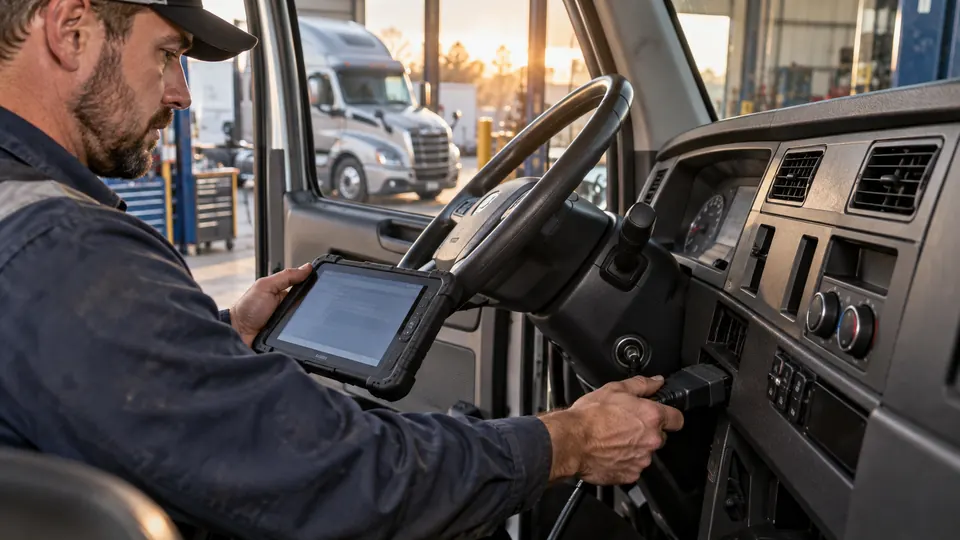
A Freightliner Cascadia can present a very different diagnostic job from one truck to the next. Engine choice, model year, electronic modules, connector type, and the fault itself all affect what a scanner can access. A basic OBD-II reader may show limited engine information, while a genuine heavy-duty tool can work through HDOBD connections, J1939 or J1708/J1587 communication, live data, ABS, transmission, and aftertreatment systems where supported.
The big mistake is treating a Freightliner compatibility claim as proof that every Cascadia configuration will receive the same coverage. A scanner listed for Freightliner may still vary by engine, ECU, model year, and function. Code reading is also a different job from full-system diagnostics, and DPF information does not automatically mean the tool can perform a regeneration. For broad Cascadia diagnostics, the ANCEL HD601 is the strongest starting point here because it combines heavy-duty system coverage, multiple connectors, J1939 and J1587/J1708 support, live data, and a built-in SPN/FMI lookup.
The choices below range from compact code readers to large diagnostic tablets with active tests, ECU coding, DPF functions, and service resets. The right pick depends on whether you need roadside fault checks, engine-specific regeneration, mixed-fleet coverage, or deeper workshop diagnostics. Always match the scanner against the Cascadia’s exact engine, year, connector, and required function before ordering.
Quick Answer
- Best Overall: ANCEL HD601 for broad heavy-duty diagnostics, multiple connectors, and useful code interpretation.
- Best for Detroit and PACCAR DPF Work: ANCEL HD110, provided its listed engine coverage matches your Cascadia.
- Best for Deep Workshop Diagnostics: ANCEL X7HD PRO with bidirectional controls, ECU coding, and more than 40 listed service functions.
- Best for Broad Aftertreatment and Active Testing: ANCEL V6HD, which adds DPF, DEF/SCR, active-test, and adapter coverage for supported vehicles.
Best Scanner for Freightliner Cascadia Comparison Table
| Product | Relevant Cascadia Coverage | Diagnostic Depth | Key Functions |
|---|---|---|---|
| ANCEL HD601 | Freightliner and major diesel brands | Full-system HDOBD and OBD-II | J1939, J1587/J1708, live data, SPN/FMI lookup |
| ANCEL HD110 | Compatible Freightliner applications with Detroit or PACCAR engines | Multi-system diagnostics | DPF regeneration, live data, 9-pin and 16-pin adapters |
| NEXAS NL102 | Freightliner and Class 4–8 diesel trucks | General full-system diagnostics | Code reading, clearing, live data, built-in DTC lookup |
| LAUNCH CRP129HD | Freightliner and broad commercial-truck coverage | Full-system and service functions | DPF regen, injector coding, DEF test, seven-plus resets |
| LAUNCH Creader HD V2 | Freightliner, PACCAR, International, Volvo, and others | HDOBD and OBD-II code diagnostics | J1939, J1708, six-pin, nine-pin, 16-pin, battery monitoring |
| ANCEL HD100 | Supported Freightliner applications and diesel components | Phone-based full-system diagnostics | DPF regen for compatible Cummins and Caterpillar engines |
| ANCEL X7HD PRO | Compatible Freightliner and mixed-fleet applications | Professional tablet-level diagnostics | Bidirectional tests, ECU coding, 42-plus functions |
| ANCEL V6HD | Freightliner and multiple commercial vehicle types | Advanced diagnostics and active tests | DPF, DEF/SCR, bidirectional testing, 40-plus functions |
| ANCEL HD120 | Freightliner and other major truck brands | App-based full-system diagnostics | Parked DPF regen for compatible Volvo and MaxxForce engines |
The detailed reviews explain where each scanner fits, which Cascadia configurations it may suit, and where the product information leaves compatibility open.
1. ANCEL HD601 — Best Overall

The HD601 makes the most sense as a general-purpose first scanner for a Freightliner Cascadia because its listed coverage reaches beyond a passenger-car OBD-II reader. The product information identifies Freightliner support alongside Peterbilt, Kenworth, International, Volvo, and Western Star, with heavy-duty engine coverage associated with Cummins, Detroit, and PACCAR. It also lists diagnostics for engine, transmission, ABS, and other supported systems, which gives the tool a broader role during a warning-light investigation.
Its connector and protocol combination is especially useful for a truck that may not present the same diagnostic setup as a light-duty vehicle. The HD601 lists six-pin, nine-pin, and 16-pin connections, plus J1939 and J1587/J1708 communication. A built-in DTC library and manual SPN/FMI lookup can help translate a code into a more useful starting point, particularly when the truck is stopped roadside and internet access is poor. The product information still warns that coverage varies by year, system, and configuration, so broad Freightliner support should not be read as a guarantee for every Cascadia ECU.
Pros
- Lists Freightliner support along with several major commercial-truck brands.
- Provides full-system diagnostics for supported engine, transmission, ABS, and other systems.
- Supports J1939 and J1587/J1708 heavy-duty communication.
- Includes six-pin, nine-pin, and 16-pin connector support.
- Offers live data, freeze-frame information, SPN/FMI lookup, and lifetime free updates.
Cons
- The supplied information does not identify exact Cascadia model-year or engine coverage.
- DPF regeneration is not listed as a function of this model.
This is the sensible choice for buyers who want one standalone tool for routine Cascadia fault checks rather than a specialized regeneration or workshop tablet. It gives up the deeper active tests and ECU coding listed for the X7HD PRO and V6HD, yet its broader everyday focus may be more useful than paying for functions that will rarely be used. Confirm the exact engine and required module access before purchase, especially if the goal is aftertreatment service rather than general diagnostics.
To buy this product, click here.
2. ANCEL HD110 — Best for Detroit and PACCAR DPF Work

A Cascadia owner dealing with a DPF warning may need a different tool from someone checking an intermittent electrical fault. The HD110 is aimed at that narrower problem, with listed DPF regeneration capability for compatible Detroit and PACCAR engines. Its engine examples include Detroit DD13, DD15, and DD16, plus PACCAR PX-7, PX-9, MX-11, and MX-13. That makes it particularly relevant for Cascadias using one of those listed engine families, although the product information does not establish that every model year or ECU supports every function.
The HD110 also reaches beyond a single engine screen. Its listed systems include engine, transmission, DPF, ABS, and fuel, with read-and-clear codes, live data, freeze-frame data, and DTC lookup. The included nine-pin and 16-pin adapters are practical for common commercial-truck connections, while Bluetooth and Wi-Fi give the device a portable setup. Its lifetime update claim and lack of recurring subscription fees add appeal for regular use, but regeneration should still be treated as a vehicle-dependent service procedure, not a universal button that applies to every Cascadia.
Pros
- Lists DPF regeneration support for compatible Detroit and PACCAR diesel engines.
- Names Detroit DD13, DD15, DD16, PACCAR PX-7, PX-9, MX-11, and MX-13 coverage.
- Includes nine-pin and 16-pin adapters for supported heavy-duty vehicles.
- Provides engine, transmission, DPF, ABS, and fuel diagnostics where supported.
- Lists lifetime free updates without recurring subscription fees.
Cons
- Its strongest engine-specific functions are narrower than the broader HD601 coverage.
- Exact Cascadia model-year and ECU applicability must be confirmed before using regeneration functions.
The HD110 deserves a high position for a Cascadia running a listed Detroit or PACCAR engine where DPF service is central to the purchase. It is less compelling as a general workshop platform than the larger Launch and ANCEL tablets, and it should be skipped if the truck uses an engine outside its stated focus. For the right engine, though, its combination of regeneration, system scanning, and portable hardware is more relevant than a basic code reader.
To buy this product, click here.
3. NEXAS NL102 — Best for Straightforward Full-System Checks

The NEXAS NL102 takes a simpler route than the tablet-style scanners. Its listing describes a tool for Class 4–8 diesel trucks, including Freightliner, Peterbilt, Kenworth, Volvo, Mack, and Cummins-powered vehicles. For a Cascadia owner who mainly wants to read and clear faults, inspect live engine data, and understand a warning light before visiting a repair facility, that focus keeps the workflow fairly direct.
Built-in DTC explanations are useful here because raw truck codes can be difficult to interpret without a reference nearby. The NL102 also lists full-system general diagnostics and complete OBD-II functionality, but its product information specifically says that DPF regeneration belongs to the NL102P or NL102 Plus models. That distinction matters. This standard NL102 should be viewed as a diagnostic code and data tool, not a regeneration device. Its broad Freightliner wording is helpful, while exact Cascadia engine and model-year coverage remains something to verify.
Pros
- Lists Class 4–8 diesel-truck use and Freightliner compatibility.
- Supports reading and clearing fault codes across supported systems.
- Provides live data and built-in DTC explanations.
- Offers full-system general diagnostics alongside OBD-II functions.
- Includes free lifetime updates and technical support.
Cons
- The standard NL102 does not list DPF regeneration.
- Exact protocols, connectors, and Cascadia engine coverage are not fully identified in the supplied information.
This is a good fit for routine troubleshooting when the job starts with a warning light, stored code, or live-data question. It gives up the HD110’s listed regeneration focus and the advanced active testing of the premium tablets, so a buyer planning injector coding, module work, or aftertreatment procedures should look higher in the list. Its value lies in keeping general diagnostic work clear and focused without pretending to be a full service platform.
To buy this product, click here.
4. LAUNCH CRP129HD — Best for Service Resets

The CRP129HD is built for buyers who need more than fault-code retrieval. Its product information lists full-system access across engine, ABS, transmission, SRS, SAS, TPMS, and other supported systems, along with live data, freeze-frame information, and DTC lookup. For a commercial operation that handles more than one truck brand, the listing names Freightliner, Cummins, Detroit, PACCAR, Volvo, Kenworth, Peterbilt, International, Mack, and others.
Its service menu is the real reason to look at this model. The scanner lists forced DPF regeneration, DPF reset, injector coding, DEF testing, speed-limit adjustment, cylinder cutout, clutch relearn, and oil reset functions. It also identifies J1939, J1708, J1587, and OBD2/CAN support. These features can be useful in a shop setting, but the listing states that functions vary by vehicle model. The two-year free update period is shorter than the lifetime update claims on several simpler tools, although the product information says installed features remain usable after that period.
Pros
- Lists forced DPF regeneration and DPF reset functions.
- Includes injector coding, DEF test, cylinder cutout, clutch relearn, and oil reset functions.
- Supports J1939, J1708, J1587, and OBD2/CAN protocols as listed.
- Provides broad multi-brand coverage that includes Freightliner.
- Offers remote diagnostic support, a one-year hardware warranty, and two years of free updates.
Cons
- Specific service functions may vary considerably by Cascadia model, engine, and ECU.
- The included free update period is limited to two years.
The CRP129HD suits a buyer who wants a middle path between a basic scanner and a high-end diagnostic tablet. Its service-function list is stronger than the NL102 or Creader HD V2, yet it does not list the 42-plus functions and ECU coding depth of the X7HD PRO. Verify the exact DPF, DEF, injector, or clutch function required for the truck before purchase, since the broad menu should not be interpreted as universal Cascadia access.
To buy this product, click here.
5. LAUNCH Creader HD V2 — Best Budget Heavy-Duty Connector Coverage

The Creader HD V2 keeps the focus on core diagnostic work while offering a useful selection of heavy-duty connections. Its listing names Freightliner, PACCAR, International, Volvo, Cummins, Caterpillar, and Detroit applications, with HDOBD and OBD-II/EOBD functions. Six-pin, nine-pin, CT nine-pin, and 16-pin connectors are identified, which can save a buyer from discovering after delivery that the plug does not match the truck.
For daily fault checks, the tool lists code reading and clearing, live data, graphical data display, voltage detection, data printing, and I/M readiness. Automatic protocol recognition may speed up initial connection, while manual selection gives more control when an automatic scan does not identify the system as expected. The battery-monitoring function adds a useful electrical check. This remains a code-reader-style tool, however, rather than a scanner with documented DPF regeneration, bidirectional tests, or ECU coding.
Pros
- Lists Freightliner and several common heavy-duty engine and truck applications.
- Includes six-pin, nine-pin, CT nine-pin, and 16-pin connector support.
- Supports J1708, J1939, J1979, J1850 PWM, and J1850 VPW protocols as listed.
- Provides automatic and manual communication-protocol selection.
- Offers live data, graphical display, battery monitoring, printing, and lifetime free upgrades.
Cons
- Advanced service functions, DPF regeneration, and bidirectional controls are not listed.
- Exact Cascadia system and model-year coverage is not specified.
This is a practical lower-cost choice for someone who wants broad connector coverage and basic heavy-duty troubleshooting without moving into tablet-level service equipment. It may be the better fit than a generic passenger-car OBD-II reader, but it cannot replace the CRP129HD or X7HD PRO for regeneration, coding, or active tests. Its strongest advantage is straightforward access to codes and data across supported connections.
To buy this product, click here.
6. ANCEL HD100 — Best Phone-Based Option

The HD100 puts the display in a phone or tablet through the ANCEL Trucker App. That changes the carrying experience: the compact adapter can stay in a cab or service bag, while fault codes, live data, reports, and supported functions appear on an iPhone or Android device. For roadside work, that can feel less bulky than carrying a dedicated diagnostic tablet, and the lock-ring connector is intended to keep the connection secure during testing.
Its strongest Cascadia-specific relevance is the combination of Freightliner coverage, full-system diagnostics, and parked DPF regeneration for compatible Cummins and Caterpillar engines. The listing also names support for systems and components associated with Detroit, Allison, Bendix, Eaton, and WABCO, plus J1939 and J1708 communication. Those are broad supported-coverage statements rather than a guarantee for every truck configuration. DPF functions vary by engine and ECU, and the listing clearly says the tool is not for pickup trucks.
Pros
- Uses a free phone app for wireless heavy-duty diagnostics.
- Lists Freightliner support and diagnostics for engine, transmission, ABS, aftertreatment, and other systems.
- Provides parked DPF regeneration and DPF reset for compatible Cummins and Caterpillar engines.
- Supports J1939 and J1708 communication with nine-pin and 16-pin connections.
- Lists lifetime free updates without activation or annual software fees.
Cons
- DPF regeneration coverage is limited to compatible Cummins and Caterpillar applications.
- Using the tool requires a compatible phone or tablet and the app workflow.
The HD100 is a strong choice for someone who values portability and needs a specific Cummins or Caterpillar aftertreatment function. It is less suitable for a shop that wants a large dedicated screen, extensive active testing, or documented ECU coding. Check the Cascadia’s engine and ECU before purchase, since a Freightliner badge alone does not establish that the listed DPF function will operate.
To buy this product, click here.
7. ANCEL X7HD PRO — Best for ECU Coding and Active Tests
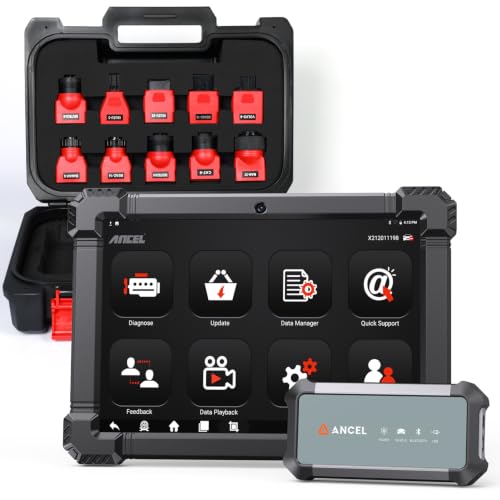
The X7HD PRO is aimed at a workshop that wants diagnostic access, service procedures, and post-repair functions in one tablet. Its listed coverage includes compatible Freightliner, Kenworth, Peterbilt, Volvo, Mack, and International trucks, plus Cummins, Caterpillar, Detroit, PACCAR, and Navistar engines. That breadth is useful for a mixed fleet, though it should be read as supported coverage rather than a promise that every Cascadia module will expose every function.
The tablet lists full-system diagnostics, bidirectional controls, ECU coding, module matching, adaptations, relearns, and more than 42 service functions. It also lists DPF regeneration, injector coding, oil reset, throttle adaptation, EPB reset, and ABS bleeding. A 10.1-inch Android screen, live-data graphs, recording, playback, report saving, printing, Wi-Fi, and Bluetooth make it more appropriate for repeated shop use than a small handheld reader. Its included update period is two years, after which the installed functions remain usable according to the product information.
Pros
- Lists full-system diagnostics across compatible Freightliner and mixed-fleet applications.
- Includes bidirectional controls and active tests for supported components and systems.
- Lists ECU coding, module matching, adaptations, and relearn procedures.
- Provides more than 42 service and reset functions, including supported DPF regeneration.
- Offers a 10.1-inch display, live-data recording, reports, cameras, Wi-Fi, and Bluetooth.
Cons
- Specific active tests, coding functions, and service procedures depend on the vehicle and ECU.
- Free software updates are listed for two years rather than indefinitely.
This is the strongest fit for a repair shop or fleet yard that will use advanced functions repeatedly. It offers much deeper functionality than the HD601, but that extra capability adds complexity and may be unnecessary for a driver who only needs code and live-data access. Confirm the exact Cascadia procedure before assuming that a listed function covers the truck’s particular engine or module.
To buy this product, click here.
8. ANCEL V6HD — Best for Aftertreatment and Bidirectional Testing

The V6HD targets buyers who need to investigate diesel systems more deeply than a basic code reader allows. Its listed Freightliner coverage sits alongside Kenworth, Peterbilt, Mack, International, Volvo, Hino, Isuzu, and several engine families including Cummins, Detroit, PACCAR, Caterpillar, and International A26. J1939 and J1708 support is also identified, with the important qualification that vehicle and function coverage still needs to be verified.
Aftertreatment is a major part of its appeal. The product information lists DPF regeneration, soot-load data, differential pressure, exhaust temperature, NOx sensor information, DEF level data, and SCR diagnostics for supported systems. Bidirectional tests are also listed, including commands for supported injectors, EGR/VGT actuators, cooling fans, fuel pumps, relays, and cylinder cut-off testing. An eight-inch display, wireless VCI, ten listed adapters, and 40-plus diesel service functions give it a strong workshop profile. Those active tests remain vehicle- and module-dependent, so the feature count should not be treated as universal access.
Pros
- Lists Freightliner coverage across a broad commercial-vehicle and engine range.
- Provides DPF regeneration and detailed supported DPF, NOx, DEF, and SCR data.
- Includes bidirectional tests and cylinder cut-off testing for supported systems.
- Lists more than 40 diesel service functions and a complete heavy-duty adapter kit.
- Offers J1939 and J1708 support, two years of official updates, remote support, and a one-year warranty.
Cons
- The advanced functions depend on the supported Cascadia vehicle, engine, and ECU.
- Its two-year update period is shorter than the lifetime update claims on several basic tools.
The V6HD is a particularly good fit where aftertreatment data and active testing matter as much as code retrieval. It may be excessive for a simple roadside check, and the included adapter list does not eliminate the need to verify the specific truck application. Buyers choosing between it and the X7HD PRO should focus on the exact functions they need, since both offer advanced capabilities but emphasize their toolkits differently.
To buy this product, click here.
9. ANCEL HD120 — Best for Compatible Volvo and MaxxForce Applications

The HD120 earns its place through a specific parked-regeneration focus rather than maximum diagnostic breadth. Its listing identifies full-system HDOBD and OBD-II diagnostics for Freightliner, International, Kenworth, Mack, Peterbilt, Western Star, and Volvo, with engine, ABS, transmission, and other system access where supported. The compact adapter connects through Bluetooth to the ANCEL Trucker app, keeping the setup convenient for a cab, repair bay, or roadside kit.
Its parked DPF regeneration function is listed for compatible Volvo and International MaxxForce diesel engines. That limitation is central to the buying decision. The product information specifically says Cummins-powered Volvo or International trucks require the HD100 for regeneration functions, and some Volvo engine IDs may have limitations. A Cascadia owner should therefore view the HD120 as a targeted option, not a universal DPF tool. The nine-pin rotary-lock and 16-pin connectors, live data, code access, and lifetime free updates still make it useful for broader supported diagnostics.
Pros
- Lists full-system diagnostics for Freightliner and several other heavy-duty truck brands.
- Provides parked DPF regeneration for compatible Volvo and International MaxxForce engines.
- Uses a compact Bluetooth adapter and ANCEL Trucker app.
- Includes rotary-lock nine-pin and 16-pin commercial-truck connectors.
- Offers lifetime free updates without recurring subscription fees.
Cons
- Listed DPF regeneration coverage is limited to compatible Volvo and International MaxxForce engines.
- Cummins-powered Volvo or International applications are directed to the HD100 for regeneration.
This model suits a buyer whose truck and regeneration requirement align with the specific Volvo or MaxxForce coverage listed. It is a weaker match for a Detroit- or PACCAR-powered Cascadia, where the HD110 may be more relevant, and it does not offer the workshop-level active testing of the V6HD or X7HD PRO. Its value comes from targeted compatibility, compact operation, and a clear app-based workflow.
To buy this product, click here.
Buying Guide
Confirm the Cascadia’s Engine and Model Year
Freightliner coverage is a useful starting point, but it does not identify every Cascadia configuration. The same truck name can cover different engine families, electronic systems, and model years. Before choosing a scanner, write down the truck year, engine make and model, diagnostic connector, and the system causing trouble. A tool that lists Freightliner may provide broad code access while lacking the specific DPF, coding, or active-test function you need.
Separate Heavy-Duty Protocols From Physical Connectors
J1939, J1708, and J1587 describe communication protocols, while six-pin, nine-pin, and 16-pin references describe physical connections. A connector that fits the truck does not prove that every protocol or ECU is supported. The HD601 and Creader HD V2 list several connector types, while the HD110 identifies nine-pin and 16-pin adapters. That helps with physical setup, but compatibility still needs to be checked at the vehicle and function level.
Decide Whether You Need Codes or Full-System Access
A code reader can be enough for checking a warning light, viewing live data, or clearing a stored fault after repairs. Full-system tools go further by reaching supported engine, transmission, ABS, body, and aftertreatment modules. The NL102 and Creader HD V2 focus on general diagnostic tasks, while the HD601, HD100, X7HD PRO, and V6HD list broader system access. More access can be useful, but it does not mean every ECU is available on every Cascadia.
DPF Diagnostics Are Different From Regeneration
Look for the exact function you need. A scanner may read DPF codes or display soot-related data without initiating a regeneration. The HD110, CRP129HD, HD100, V6HD, X7HD PRO, and HD120 list regeneration-related functions, but their engine and vehicle coverage differs. The HD120 is specifically limited in the supplied information to compatible Volvo and International MaxxForce engines, while the HD100 names compatible Cummins and Caterpillar engines. Verify the engine before relying on a regeneration claim.
Active Tests and ECU Coding Are Vehicle-Dependent
Bidirectional control can let a scanner command supported components and observe their response. ECU coding and module matching can assist with supported post-repair procedures. Those capabilities do not apply universally. The X7HD PRO and V6HD list active tests, while the X7HD PRO also lists ECU coding and module matching. Ask whether the exact Cascadia engine, ECU, and procedure are supported instead of choosing based only on a large function count.
Check Updates, Apps, and Ongoing Setup
Several tools list lifetime free updates, including the HD601, HD110, NL102, Creader HD V2, HD100, and HD120. The CRP129HD, X7HD PRO, and V6HD list two years of updates. The product information for the tablet tools says existing functions remain usable after the included update period, but future coverage and improvements may depend on later software access. App-based tools such as the HD100 and HD120 also require a compatible phone or tablet, while standalone scanners keep the display and controls in the tool.
Best Scanner for Freightliner Cascadia FAQ
What Is the Best Scanner for a Freightliner Cascadia?
The ANCEL HD601 is the strongest general choice in this comparison because it lists Freightliner coverage, full-system heavy-duty diagnostics, J1939 and J1587/J1708 support, six-pin, nine-pin, and 16-pin connections, live data, and SPN/FMI lookup. Exact coverage still depends on the Cascadia’s year, engine, system, and configuration.
Will a Basic OBD-II Scanner Work on a Freightliner Cascadia?
A standard OBD-II reader may provide limited access on a compatible vehicle, but it should not be treated as a full heavy-duty Cascadia scanner. Heavy-duty tools in this comparison list HDOBD protocols, commercial-truck connectors, or systems such as ABS and transmission that ordinary passenger-car readers may not reach.
Does J1939 Support Mean the Scanner Works With Every Cascadia?
No. J1939 is a communication protocol, not a guarantee of complete truck, ECU, or service-function coverage. The scanner must also support the truck’s model year, engine, connector, electronic systems, and requested diagnostic task.
Which Scanner Can Perform DPF Regeneration on a Cascadia?
The answer depends on the engine and ECU. The HD110 lists regeneration for compatible Detroit and PACCAR engines. The HD100 lists parked regeneration for compatible Cummins and Caterpillar engines. The HD120 lists parked regeneration for compatible Volvo and International MaxxForce engines. The CRP129HD, X7HD PRO, and V6HD also list DPF regeneration, with vehicle-dependent coverage. Verify the exact application before purchase.
Is DPF Reset the Same as DPF Regeneration?
No. A DPF reset and a regeneration are separate functions. Resetting a service value does not automatically mean the tool can initiate a regeneration, and reading DPF data does not prove that either service function is available.
Do I Need a Scanner With Bidirectional Controls?
Bidirectional controls are useful if you need to command supported components or perform active tests during diagnosis. They are less important for basic code reading and live-data checks. The X7HD PRO and V6HD list bidirectional functions, but the specific tests depend on the supported Cascadia system and ECU.
Are Lifetime Updates Really Unlimited for Every Function?
The listed products describe lifetime free updates for their software, but that wording should not be expanded into a guarantee of every future vehicle, function, cloud feature, or compatibility improvement. Review the product’s current update terms and confirm that the required Cascadia coverage is included.
Should I Choose a Standalone Scanner or a Phone-Based Tool?
A standalone scanner keeps the screen, controls, and diagnostic software together. A phone-based option such as the HD100 or HD120 uses a Bluetooth adapter and an app, which can reduce the size of the hardware carried in the cab. Choose based on whether you prefer a dedicated display or already rely on a compatible phone or tablet during roadside work.
Final Verdict
The ANCEL HD601 is the strongest overall recommendation for a Freightliner Cascadia because it addresses the broad diagnostic needs most buyers face without narrowing the purchase to one engine family or one service procedure. Its listed Freightliner coverage, full-system diagnostics, J1939 and J1587/J1708 support, multiple connector types, live data, and SPN/FMI lookup create a well-rounded starting point. That does not make it universal, so confirm the truck’s exact year, engine, ECU, and required function before ordering.
Buyers focused on DPF work should look more closely at the HD110, HD100, HD120, CRP129HD, or V6HD according to the engine coverage listed for each tool. For a repair shop that needs active tests and ECU-related procedures, the X7HD PRO offers the deepest listed feature set, while the Creader HD V2 and NL102 keep general troubleshooting more straightforward. Match the scanner to the actual task, connector, and engine rather than choosing by brand count or headline function total.

- Caleb
Caleb writes about heavy-duty truck scanners, diagnostic tools, vehicle compatibility, and related technologies for Best Truck Scanners. His work focuses on making product specifications and diagnostic features easier to understand and compare.
- Best J1939 Diagnostic Adapter: 9 Picks in 2026 November 14, 2026
- 6-Pin vs 9-Pin Truck Diagnostic Connector: Key Differences Explained November 12, 2026
- Best Scanner for Cummins X15: 9 Picks in 2026 November 10, 2026
- Best Scanner for PACCAR MX-13: 9 Picks in 2026 November 8, 2026
- SPN vs FMI: Understanding Heavy-Duty Diagnostic Fault Codes November 6, 2026