Best Scanner for Peterbilt: 9 Picks in 2026

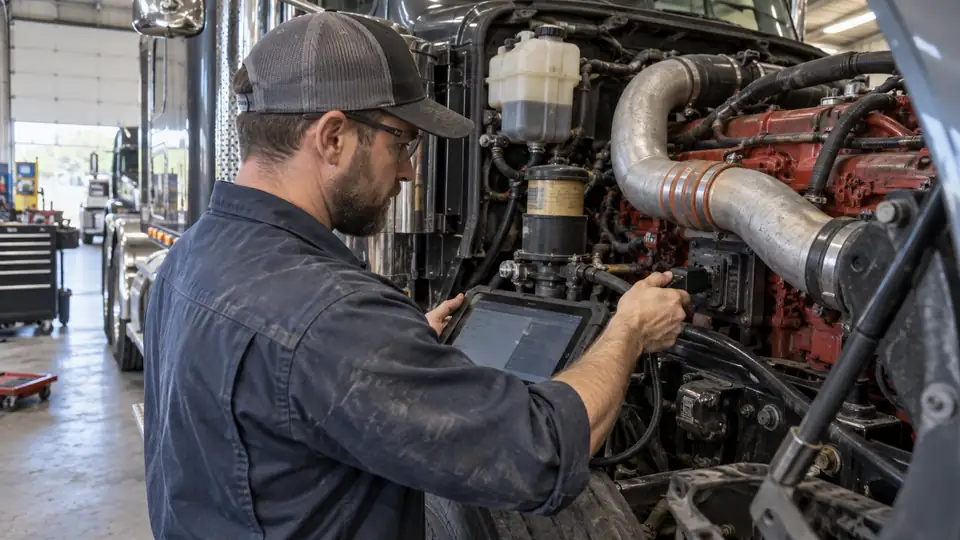
A Peterbilt warning light can turn a quiet stop into a long roadside delay, especially when the truck uses several electronic systems and the fault code alone does not reveal the real cause. A useful scanner should match the truck’s heavy-duty communication setup, reach more than basic engine codes when needed, and provide the connector support required by the specific Peterbilt and engine combination.
The badge on the hood is only the starting point. Peterbilt trucks can use different engines, ECUs, model years, and diagnostic configurations, so a scanner listed for Peterbilt is not automatically suitable for every function on every truck. J1939, J1708, and J1587 support help establish communication, but they do not guarantee identical access to every module or service procedure. For most buyers, the ANCEL HD3400 Pro offers the strongest balance of Peterbilt coverage, full-system diagnostics, DPF functions, reporting tools, and long-term update value.
The products below range from compact code readers for roadside checks to larger tablets with active tests, ECU coding, and service functions. The most suitable choice depends on whether your priority is basic fault diagnosis, DPF regeneration, wireless phone-based access, broader shop coverage, or deeper post-repair work.
Quick Answer
- Best Overall: ANCEL HD3400 Pro for broad heavy-duty coverage, supported DPF regeneration, reports, and Peterbilt compatibility.
- Best Premium: ANCEL X7HD PRO for shops and fleets that need bidirectional controls, ECU coding, and more than 40 service functions.
- Best for Detroit and PACCAR Peterbilt Trucks: ANCEL HD431 with listed DPF regeneration support for compatible PACCAR and Detroit engines.
- Best Compact Wireless Option: ANCEL HD100 for phone-based diagnostics, supported Cummins and Caterpillar DPF functions, and easy storage in a cab or toolbox.
Best Scanner For Peterbilt Comparison Table
| Product | Best For | Diagnostic Depth | Key Function |
|---|---|---|---|
| ANCEL HD3400 Pro | Best overall Peterbilt coverage | Full-system, live data, reports | Supported DPF regen and reset |
| ANCEL X7HD PRO | Shops and mixed fleets | Full-system, active tests, coding | 42+ service functions |
| ANCEL HD431 | PACCAR and Detroit engines | Full-system, standalone operation | Listed forced DPF regeneration |
| ANCEL HD110 | Detroit and PACCAR DPF work | System diagnostics, live data | Supported DPF regeneration |
| ANCEL HD100 | Wireless roadside diagnostics | Full-system through app | Supported Cummins and Caterpillar DPF functions |
| NEXAS NL102 Plus | Broad protocol and connector coverage | Full-system, live data | DPF regeneration and oil reset |
| ANCEL X7HD | Tablet-based service work | Full-system, active tests, coding | 40+ reset and service functions |
| ANCEL HD601 | Budget full-system scanning | Full-system, freeze frame, live data | J1939 and J1708/J1587 support |
| ANCEL HD210 | Wireless data and parameter adjustments | Full-system on supported trucks | Speed and idle adjustment |
The detailed reviews explain where each scanner fits, which Peterbilt-related claims are supported, and which limitations deserve a closer look before ordering.
1. ANCEL HD3400 Pro: Best Overall

The HD3400 Pro is the strongest all-around match for a Peterbilt owner who wants more than a basic check-engine reader. Its listed coverage includes Peterbilt, PACCAR, Cummins, Detroit, Caterpillar, Volvo, Mack, International, and other heavy-duty applications. The tool supports full-system diagnostics, live data, vehicle information, fault-code clearing, and pre- and post-scan reports. That combination matters when a truck fault involves the transmission, ABS, or aftertreatment system rather than the engine alone.
Its supported DPF regeneration and reset functions give it a clear advantage over scanners that stop at code retrieval. The listing also identifies topology display, wiring diagrams, Pin Detect, and reporting functions. Those features can help organize a complicated diagnostic session, although coverage remains dependent on the truck, engine, ECU, and protocol. The product information specifically cautions that some newer Detroit applications using UDS may not support DPF regeneration, and Cummins wiring diagrams have a narrower scope. Verify the exact Peterbilt configuration before relying on a service function.
Pros
- Lists Peterbilt and PACCAR coverage alongside several major heavy-duty engine platforms.
- Supports full-system diagnostics, live data, freeze-frame information, and fault-code clearing.
- Includes listed DPF regeneration and reset functions on supported applications.
- Topology display, Pin Detect, wiring diagrams, and pre/post-scan reports add diagnostic context.
- Product information lists free software updates without annual update fees.
Cons
- DPF regeneration is not available on every engine or protocol, including some newer Detroit UDS applications.
- The wiring-diagram feature is identified for Cummins engines, so it should not be treated as universal coverage.
This is the best starting point for a Peterbilt buyer who wants one scanner for routine system checks and supported aftertreatment work. It is more capable than a simple roadside code reader, yet it avoids the larger investment and more involved workflow of the X7HD tablets. Buyers focused on ECU coding or extensive active tests may need a premium tablet instead.
To buy this product, click here.
2. ANCEL X7HD PRO: Best Premium
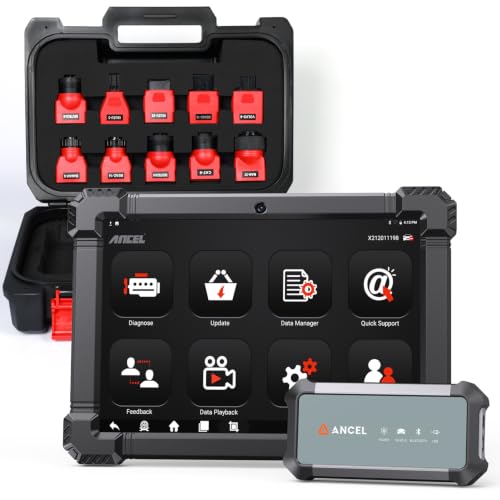
A Peterbilt repair operation that handles recurring maintenance, component replacement, and mixed-brand trucks may benefit from the X7HD PRO’s deeper toolkit. The product information lists full-system diagnostics, HDOBD and OBD2 support, more than 40 service functions, bidirectional controls, and ECU coding. That puts it in a different category from a compact code reader. The 10.1-inch Android screen is intended for graphs, test results, and longer diagnostic sessions where a small display can become tiring.
Its active-test capability is especially relevant for troubleshooting that cannot be settled by reading a fault code. The listing describes commands for supported injectors, cooling fans, throttle actuators, and ABS-related systems, but those functions remain vehicle and system dependent. ECU coding, module matching, adaptations, and relearns are also listed for compatible applications. Two years of included software updates are identified, after which installed functions can continue to be used according to the product information. That update period is shorter than the lifetime-update claims attached to several smaller scanners.
Pros
- Lists 42 or more service and reset functions for supported vehicles.
- Includes bidirectional controls, active tests, and ECU coding capabilities.
- Supports Peterbilt and other major truck makes across mixed-fleet applications.
- Large 10.1-inch display supports live-data graphs, recording, and report printing.
- Provides a two-year included update period and Bluetooth 5.0 and Wi-Fi connectivity.
Cons
- Advanced functions can vary by truck, engine, ECU, and supported system.
- Included software updates cover two years, rather than the lifetime period listed for some alternatives.
Choose this model when the scanner will spend its time in a shop, fleet yard, or service vehicle and the extra functions will actually be used. It is a poor fit for someone who only wants to retrieve an occasional Peterbilt fault code. Before purchase, match the required coding or active-test function to the exact truck rather than assuming that the headline feature list applies universally.
To buy this product, click here.
3. ANCEL HD431: Best for PACCAR and Detroit Engines

The HD431 earns a high position because its listed engine coverage lines up closely with many Peterbilt configurations. The product information specifically identifies PACCAR engines such as the PX-7, PX-9, MX-11, and MX-13, plus Detroit DD13, DD15, and DD16. It also lists Peterbilt among the supported truck makes. That level of detail is more useful than a vague claim that a scanner works with “diesel trucks,” although the exact model year and ECU still need verification.
Its headline service feature is forced DPF regeneration for supported PACCAR and Detroit applications. The standalone design uses a 4.3-inch display and physical buttons, which can be practical beside a truck when gloves, glare, or a low phone battery make an app-based tool inconvenient. The scanner supports 6-pin, 9-pin, and OBDII 16-pin connections according to the listing, along with several heavy-duty and light-duty protocols. Product information also mentions newer Detroit trucks using UDS, but compatibility may still vary by vehicle and function.
Pros
- Lists Peterbilt coverage with specific PACCAR and Detroit engine families.
- Provides listed forced DPF regeneration for supported PACCAR and Detroit applications.
- Supports 6-pin, 9-pin, and OBDII 16-pin connections according to the product information.
- Standalone screen and physical buttons avoid dependence on a phone or app connection.
- Includes lifetime Wi-Fi updates and stored diagnostic reports.
Cons
- DPF functions remain dependent on the truck’s year, ECU, protocol, and engine configuration.
- The smaller display is less suitable than a 10.1-inch tablet for extended graphing or report review.
This is a sensible choice for a Peterbilt equipped with a listed PACCAR or Detroit engine where DPF regeneration is a central requirement. It offers more direct service access than the HD601 or HD210, while keeping the interface simpler than a premium tablet. Buyers with a Cummins-powered Peterbilt should compare it with the HD3400 Pro or HD100 instead.
To buy this product, click here.
4. ANCEL HD110: Best for Detroit and PACCAR DPF Work

The HD110 takes a more focused route than the broadest scanners here. Its listed compatibility centers on Detroit and PACCAR engines, including DD13, DD15, DD16, PX-7, PX-9, MX-11, and MX-13. Those engine references make it particularly relevant for Peterbilt trucks using a supported PACCAR powertrain, while the Detroit coverage may suit buyers comparing several trucks across a fleet.
Supported systems include the engine, transmission, DPF, ABS, and fuel systems, with read and clear codes, live data, freeze-frame data, vehicle information, and DTC lookup. Bluetooth and Wi-Fi connectivity are listed, but the device is described as a compact plug-and-play scanner rather than a phone-only adapter. Included 9-pin and 16-pin adapters simplify connection for many applications. DPF regeneration is a major reason to choose it, but the product does not establish that the function works on every Peterbilt configuration carrying one of those engine names.
Pros
- Targets listed Detroit and PACCAR engine families common in heavy-duty applications.
- Supports DPF regeneration on compatible vehicles.
- Accesses engine, transmission, DPF, ABS, and fuel systems according to the listing.
- Includes 9-pin and 16-pin adapters for common heavy-duty connections.
- Lists lifetime software updates without recurring subscription fees.
Cons
- Its engine focus is narrower than scanners that list Cummins, Caterpillar, and broader mixed-fleet coverage.
- Specific DPF and system functions may vary by engine control unit and truck configuration.
The HD110 fits a buyer who knows the Peterbilt uses a supported Detroit or PACCAR engine and wants a relatively compact tool with DPF access. It is less compelling for an unknown mixed fleet where broader platform coverage is more valuable. Confirm the engine, model year, connector, and requested regeneration function before ordering.
To buy this product, click here.
5. ANCEL HD100: Best Compact Wireless Option

The HD100 is built around a different ownership pattern: leave the small interface in the cab and use a phone for the display. The listing identifies support for Peterbilt and several other major heavy-duty brands, along with J1939 and J1708 communication. After connecting to a 9-pin or 16-pin port, the ANCEL Trucker App provides code reading, code clearing, live data, DTC lookup, reports, and supported service functions.
Its DPF functions are specifically tied to compatible Cummins and Caterpillar engines, including parked regeneration and DPF reset functions. That makes the HD100 a strong candidate for a Cummins-powered Peterbilt where wireless access and aftertreatment checks matter. It is not intended for pickup trucks, and coverage varies by model, engine, ECU, and system. A phone-based setup also means the buyer must be comfortable maintaining app access and Bluetooth connectivity during a diagnostic session.
Pros
- Lists Peterbilt coverage and support for J1939 and J1708 communication.
- Provides wireless access to codes, live data, reports, and DTC lookup through a phone app.
- Lists parked DPF regeneration and reset functions for compatible Cummins and Caterpillar engines.
- Compact body and locking connectors suit cab storage and roadside use.
- Includes lifetime updates without activation or annual software fees according to the listing.
Cons
- DPF functions are limited to supported engine and ECU configurations rather than every Peterbilt.
- Requires a compatible iPhone or Android device for the display and app-based operation.
Pick the HD100 when portability is more important than a built-in screen. It can be a handy cab tool for warning-light checks and supported Cummins aftertreatment work, while the HD3400 Pro is better for a self-contained diagnostic workflow. Buyers who dislike phone pairing or need advanced active tests should look elsewhere.
To buy this product, click here.
6. NEXAS NL102 Plus: Best Connector and Protocol Coverage

The NL102 Plus is useful for buyers who need a traditional handheld scanner with several connector options. The listing identifies 6-pin, 9-pin, and 16-pin adapters, plus SAE J1939, J1587, and J1708 support. It also names Peterbilt among a long list of heavy-duty applications. That combination can make it practical for a garage or fleet that sees older and newer connection types, although physical adapter fit does not by itself prove complete access to every Peterbilt ECU.
Its diagnostic functions include full-system code access, live data, ECU information, DTC lookup, and oil-service reset on supported Cummins, Detroit, and MaxxForce applications. The product information also lists parked, driving, and onboard DPF regeneration procedures for supported engines, along with DOC cleaning procedures. The small 2.8-inch display is basic beside the tablets in this comparison, but it keeps the tool straightforward and self-contained.
Pros
- Lists 6-pin, 9-pin, and 16-pin adapters for several common heavy-duty interfaces.
- Supports J1939, J1587, and J1708 protocols according to the product information.
- Includes listed DPF regeneration and oil-reset functions for supported applications.
- Provides full-system diagnostics, live data, ECU information, and DTC lookup.
- Uses a standalone handheld design with lifetime software updates listed.
Cons
- The small 2.8-inch display offers less room for data review than the larger tablet models.
- Exact Peterbilt model-year and function coverage should be confirmed before purchase.
This scanner makes sense for someone who values connector flexibility and broad protocol support over a modern tablet interface. It may be especially useful around older commercial vehicles, but the long compatibility list should not be read as proof that every listed function applies to every truck. For newer Peterbilt service work or ECU coding, the X7HD PRO offers a deeper feature set.
To buy this product, click here.
7. ANCEL X7HD: Best Tablet-Based Service Tool

The X7HD suits a Peterbilt service environment where a large screen and several repair-oriented functions are more useful than a pocket-sized scanner. Its listed capabilities include full-system diagnostics, DPF regeneration, more than 40 resets and service functions, bidirectional control, ECU coding, and module matching. Peterbilt appears among the listed truck makes, while Cummins, Caterpillar, Detroit, PACCAR, Volvo, and Navistar are included among the engine platforms.
The tablet can display live data graphs, store reports, and support active tests on compatible systems. The listing mentions injector, ABS, throttle, and other supported component tests, but a feature label should not be treated as a guarantee for every Peterbilt ECU. It includes a 10.1-inch screen, Android operation, cameras, Bluetooth, Wi-Fi, and two years of free updates. Those features are useful for documentation and extended shop sessions, though the update period and higher purchase tier may be unnecessary for occasional fault-code checks.
Pros
- Lists Peterbilt among broad heavy-duty truck coverage.
- Combines full-system diagnostics with DPF regeneration and more than 40 service functions.
- Includes bidirectional controls, active tests, ECU coding, and module matching for supported systems.
- 10.1-inch display supports graphs, reports, and extended diagnostic sessions.
- Provides two years of included updates, cameras, Bluetooth, and Wi-Fi.
Cons
- Advanced service and coding functions depend on the specific truck, engine, ECU, and system.
- Its larger tablet format is less convenient for a buyer who only needs occasional roadside code access.
The X7HD is a strong alternative to the X7HD PRO for buyers who want nearly the same general category of tool and can work within its listed update period. It belongs in a shop that will use graphing, active tests, and service resets regularly. A basic owner-maintenance setup may get better practical value from the HD601 or HD110.
To buy this product, click here.
8. ANCEL HD601: Best Budget Full-System Scanner

The HD601 focuses on the core diagnostic work many Peterbilt owners want first: identify the system reporting a fault, retrieve the code, review live data, and decide what needs attention. The product information lists Peterbilt, Kenworth, Freightliner, International, Volvo, and Western Star coverage, along with Cummins, Detroit, and PACCAR engine support. It also identifies full-system access for areas such as the engine, transmission, and ABS on supported trucks.
J1939 and J1587/J1708 support give it a suitable heavy-duty communication foundation, while 6-pin, 9-pin, and 16-pin connectors address common commercial-vehicle interfaces. The built-in DTC library can explain codes, and the scanner allows manual SPN and FMI lookups when internet access is unavailable. It does not occupy the same service-function category as the DPF-capable models or premium tablets, but its lifetime-update listing and two-in-one heavy-duty and OBD2 role make it a practical entry point.
Pros
- Lists Peterbilt, PACCAR, Cummins, Detroit, and other common heavy-duty coverage.
- Supports full-system diagnostics, live data, freeze-frame data, and fault-code clearing.
- Includes 6-pin, 9-pin, and 16-pin connectors according to the product information.
- Provides DTC lookup plus manual SPN and FMI code searching.
- Lists lifetime free updates and both HDOBD and OBD2 operation.
Cons
- The supplied information does not identify DPF regeneration as a function.
- Coverage can vary by model year, system, engine, and truck configuration.
This is the pick for a Peterbilt owner who wants a capable diagnostic baseline without moving into a premium tablet. It can help separate an engine warning from transmission or ABS issues, which is a meaningful step above a basic passenger-car reader. Buyers who specifically need forced regeneration, ECU coding, or active tests should choose a more advanced model.
To buy this product, click here.
9. ANCEL HD210: Best for Wireless Data and Parameter Adjustments

The HD210 brings a different specialty to this Peterbilt comparison. Its listed coverage includes Peterbilt, Freightliner, Kenworth, Mack, International, Volvo, and Western Star, with full-system HDOBD and OBD2 diagnostics on supported vehicles. Through Bluetooth, the app can show codes and live data while the user moves around the truck rather than staying beside a cable-connected screen.
The distinctive functions are speed-limit and idle-speed adjustments for compatible Volvo and International MaxxForce applications. Those settings do not translate into a general Peterbilt parameter tool, so buyers should not choose the HD210 for that reason unless their exact truck and ECU are identified as supported. The scanner includes 9-pin and 16-pin heads, with a locking 9-pin design, and the listing clearly states that DPF regeneration is not supported.
Pros
- Lists Peterbilt coverage with full-system diagnostics on supported trucks.
- Provides wireless access to fault codes and live data through a Bluetooth app.
- Includes speed-limit and idle adjustments for specified Volvo and MaxxForce applications.
- Includes 9-pin and 16-pin diagnostic heads, including a locking 9-pin design.
- Lists lifetime updates without subscription fees.
Cons
- DPF regeneration is specifically not supported.
- Speed and idle adjustments are aimed at specified Volvo and International MaxxForce applications, not all Peterbilt configurations.
The HD210 is best viewed as a wireless full-system scanner with a narrow parameter-adjustment specialty, rather than a universal Peterbilt service tool. It can suit a buyer who values app-based movement around the truck and basic system access. For DPF work or deeper repair functions, the HD431, HD3400 Pro, or X7HD models are better aligned.
To buy this product, click here.
Buying Guide
Confirm the Exact Peterbilt Engine and Model Year
A Peterbilt reference in a product listing establishes brand-level relevance, not universal coverage. The same truck line can be paired with different engine platforms and electronic configurations. Before ordering, match the truck’s year, engine make, engine model, connector, and requested function against the scanner’s documented coverage. A PACCAR-focused tool may be a strong fit for one Peterbilt and a poor fit for a Cummins-powered truck.
Separate Connector Fit From Diagnostic Coverage
A 6-pin, 9-pin, or 16-pin adapter solves the physical connection problem, but it does not prove that the scanner can access every ECU. J1939, J1708, and J1587 are communication protocols, while the connector is the physical interface. A scanner needs the right combination of connection, protocol, software coverage, and supported vehicle system.
Decide Whether Code Reading Is Enough
Basic code reading can identify a fault and provide live data, which is useful for roadside triage. Full-system diagnostics reach additional areas such as the transmission, ABS, body, or instrument cluster on supported trucks. Premium tools add active tests, coding, or module matching. Paying for those functions makes sense only when the Peterbilt work actually requires them.
Check DPF Functions Carefully
DPF terminology covers several different capabilities. A scanner may read aftertreatment codes, display soot-related data, reset a system, or initiate a regeneration. Those actions are not interchangeable. The HD3400 Pro, HD431, HD110, HD100, NL102 Plus, and X7 models list regeneration-related functions, but the supported engine and ECU determine whether the procedure is available.
Review the Update Policy
Several scanners in this comparison list lifetime updates, while the X7 models list two years of included updates. The practical value depends on what those updates cover and whether new vehicle or system support matters to your operation. Do not treat “lifetime” as proof of unlimited future coverage for every function.
Choose Standalone or Phone-Based Operation
The HD431, HD601, HD110, and NL102 Plus operate as standalone scanners, while the HD100 uses a phone app for its display and controls. A wireless interface is easy to store and can let you walk around the truck during a check. A built-in screen avoids app pairing, phone battery concerns, and connection interruptions. The better format depends on how and where diagnostics happen.
Be Careful With Active Tests and Coding
Bidirectional controls let a compatible scanner send commands to supported vehicle systems, but they do not provide universal access to every actuator or ECU. ECU coding, module matching, adaptations, and relearns are also vehicle-dependent. Confirm the exact Peterbilt function before choosing a tablet for a repair procedure.
Best Scanner For Peterbilt FAQ
What is the best scanner for a Peterbilt?
The ANCEL HD3400 Pro is the strongest overall choice in this comparison because it lists Peterbilt and PACCAR coverage, full-system diagnostics, live data, reports, supported DPF regeneration, and free updates. Exact functions still depend on the truck’s engine, ECU, model year, and configuration.
Can a Peterbilt scanner read J1939 codes?
Several products here list J1939 support, including the HD3400 Pro, HD601, HD100, HD110, HD431, NL102 Plus, and the X7 models. J1939 support enables communication with compatible heavy-duty systems, but it does not guarantee access to every module or service function on every Peterbilt.
Do all Peterbilt scanners support DPF regeneration?
No. The HD601 and HD210 are presented primarily as diagnostic scanners, and the HD210 specifically does not support DPF regeneration. Models such as the HD3400 Pro, HD431, HD110, HD100, NL102 Plus, X7HD PRO, and X7 list regeneration-related functions, but availability depends on the engine, ECU, model year, and protocol.
Is a 9-pin connector enough for Peterbilt diagnostics?
No. A 9-pin connector addresses the physical connection, while the scanner must also support the relevant communication protocol and vehicle systems. Even with a compatible connector, full-system or service functions can vary by truck configuration.
Can these scanners diagnose a Cummins-powered Peterbilt?
The product information lists Cummins support for the HD3400 Pro, HD601, HD100, X7HD PRO, X7HD, NL102 Plus, and other models. That broad engine-level claim does not prove identical coverage for every Cummins model or ECU. Verify the exact engine and desired function before buying.
Is a tablet better than a handheld scanner?
A tablet such as the X7HD PRO or X7HD provides more room for graphs, reports, active tests, and service menus. A handheld scanner such as the HD601 or HD431 is easier to carry and may be faster for roadside checks. The larger format becomes worthwhile when advanced functions are part of regular work.
Can a scanner clear a Peterbilt fault permanently?
Clearing a code removes the stored fault indication when the scanner and vehicle support that function, but it does not repair the underlying problem. If the fault remains, the code may return. Diagnose and repair the cause before clearing codes, particularly for engine, brake, and aftertreatment warnings.
Final Verdict
The ANCEL HD3400 Pro is the strongest overall pick for a Peterbilt because it combines broad heavy-duty coverage with full-system diagnostics, live data, reporting tools, and supported DPF regeneration. Its listing specifically includes Peterbilt and PACCAR applications, while the topology and Pin Detect functions give the diagnostic process more structure than a basic code reader. Confirm the exact engine and ECU before relying on regeneration or other advanced functions.
The HD601 is the better budget-oriented choice for routine code and system checks, while the HD431 is more targeted for Peterbilt trucks using listed PACCAR or Detroit engines with DPF needs. Shops that require bidirectional controls, ECU coding, and extensive service functions should step up to the X7HD PRO. Match the scanner to the truck’s engine, model year, connector, protocol, and actual repair tasks, and avoid treating a broad brand list as a promise of universal coverage.

- Caleb
Caleb writes about heavy-duty truck scanners, diagnostic tools, vehicle compatibility, and related technologies for Best Truck Scanners. His work focuses on making product specifications and diagnostic features easier to understand and compare.
- Best J1939 Diagnostic Adapter: 9 Picks in 2026 November 14, 2026
- 6-Pin vs 9-Pin Truck Diagnostic Connector: Key Differences Explained November 12, 2026
- Best Scanner for Cummins X15: 9 Picks in 2026 November 10, 2026
- Best Scanner for PACCAR MX-13: 9 Picks in 2026 November 8, 2026
- SPN vs FMI: Understanding Heavy-Duty Diagnostic Fault Codes November 6, 2026